

Key Takeaways
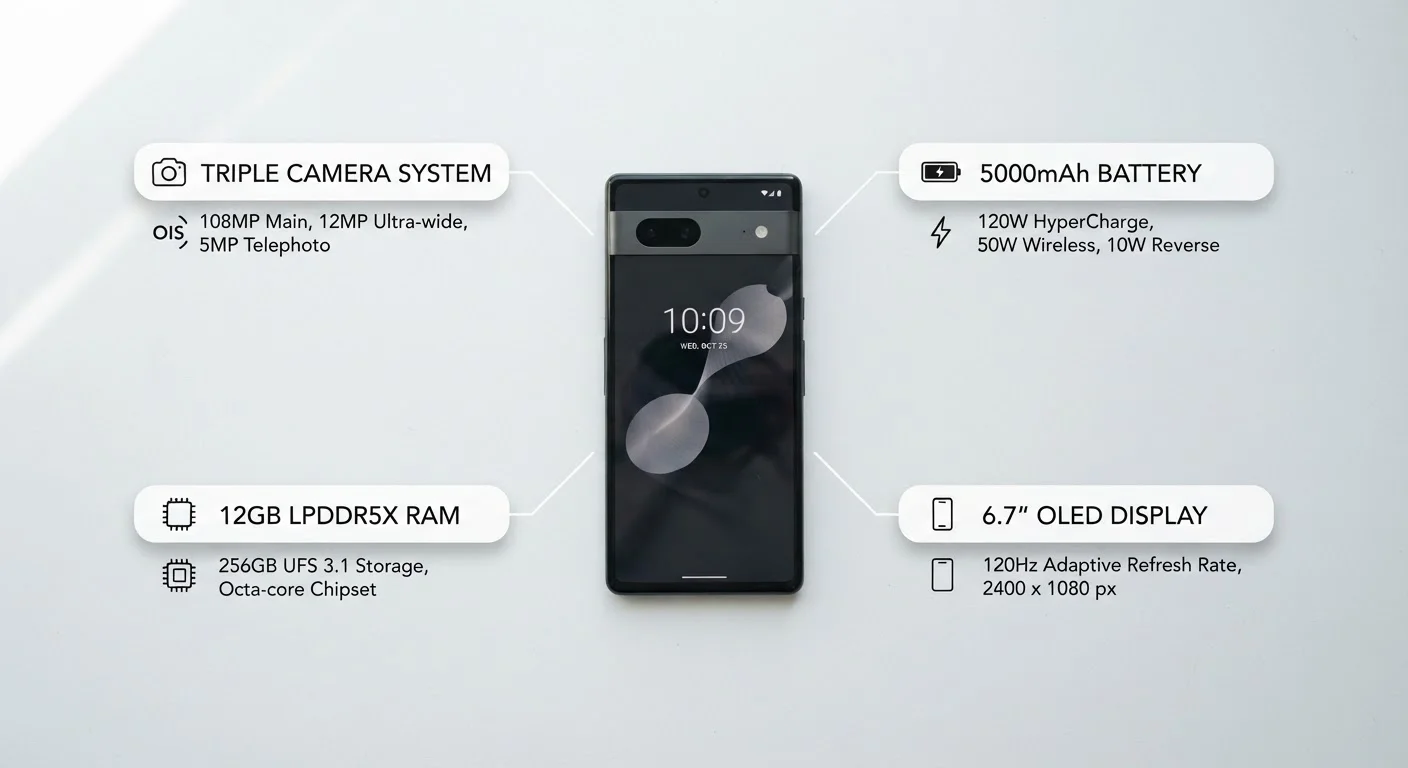
- Most everyday users are affected by only four or five specs - processor, RAM, battery, storage, and display.
- High megapixel counts don't automatically mean better photos; sensor size and software processing matter more.
- Refresh rate and RAM become important mainly for gamers and power users, not typical phone usage.
- Matching specs to your actual habits - not a manufacturer's marketing - leads to better buying decisions.
- Always check carrier compatibility and software update commitments before purchasing any device.
Start here
Why Spec Sheets Feel So Overwhelming
Core knowledge
The Specs That Actually Matter for Everyday Use
Filter the noise
Specs You Can Safely Deprioritize
Apply it
How to Match Specs to Your Real Habits
Final step
Before You Finalize Your Decision
Why Spec Sheets Feel So Overwhelming
Open any phone listing and you'll find a wall of numbers: processor cores, nanometer chip architecture, sensor aperture values, refresh rates, and RAM figures measured in gigabytes. Manufacturers have strong incentives to list every measurable feature - but that doesn't mean every figure affects your experience equally.
The challenge is that spec sheets are written to impress, not to inform. Marketing language blurs the line between genuinely useful measurements and numbers that sound impressive but rarely surface in daily use. Understanding which category each spec falls into is the core skill - and it's more accessible than it looks.
RAM
Random-access memory is the temporary workspace a phone uses to keep apps running. More RAM means more apps can stay active at once without needing to reload.
Chipset / Processor
The chipset is the phone's central engine, handling everything from app performance to camera processing. A faster chipset makes demanding tasks feel smoother.
Refresh rate
Measured in hertz (Hz), refresh rate is how many times per second the screen redraws its image. Higher rates make scrolling and animation look smoother.
mAh (milliampere-hour)
A unit that measures battery capacity - how much electrical charge the battery can store. A higher mAh figure generally means longer usage between charges.
Aperture
Aperture is the opening in a camera lens that controls how much light reaches the sensor. A wider aperture (expressed as a lower f-number) lets in more light, which helps in low-light photography.
OLED
Organic Light-Emitting Diode - a display technology where each pixel produces its own light. OLED screens typically offer deeper blacks and more vivid colors than traditional LCD screens.
The Specs That Actually Matter for Everyday Use
Processor (chipset): The processor governs how fast everything on the phone runs - apps opening, photos saving, web pages loading. A current mid-range chipset handles everyday tasks without strain. Premium chipsets primarily shine under sustained load, such as video editing or 3D gaming.
RAM: RAM (random-access memory) determines how many apps can stay ready in the background without reloading. For most users, 6GB is a comfortable floor. Heavy multitaskers or mobile gamers will feel the difference with 8GB or more.
Battery capacity and charging speed: Measured in milliampere-hours (mAh), battery capacity tells you how much energy the phone can store. A 4,500-5,000mAh battery typically delivers a full day for moderate users. Charging speed (measured in watts) determines how quickly you recover that charge - a meaningful consideration if you're often away from an outlet.
Storage: 128GB is a practical starting point for most users. Check whether the device supports expandable storage via a microSD card if you anticipate needing more room over time.
Display quality: Resolution and panel type (LCD vs. OLED, for example) shape how sharp and vibrant content looks. OLED displays tend to produce deeper blacks and more vivid colors. Resolution matters more on larger screens where low pixel density becomes visible.
Check Real-World Battery Tests
Manufacturer battery estimates are measured under controlled conditions that rarely match daily use. Independent technology publications routinely run standardized battery life tests across popular devices. Consulting those results alongside the mAh figure gives you a much more realistic picture of how long the phone will last through your actual day.
Specs You Can Safely Deprioritize
Megapixel count: A camera's megapixel figure measures resolution - how many pixels make up a photo - not image quality. Sensor size, aperture width, and software processing have a far larger impact on the photos you actually take. A phone with a smaller, well-engineered sensor often produces better real-world results than one with an inflated megapixel count.
Refresh rate beyond 60Hz: A 120Hz display scrolls and animates more smoothly than a 60Hz one, which is meaningful for gaming. For watching video, reading, and messaging, most users won't notice the difference - and higher refresh rates consume more battery. Choose 90Hz or 120Hz only if gaming or fluid scrolling is genuinely a priority.
Processor nanometer node: A smaller nanometer figure (e.g., 4nm vs. 7nm) generally signals a more efficient chip, but the real-world difference for everyday tasks is minimal. Focus on how the processor performs in practice, not the manufacturing specification.
How to Match Specs to Your Real Habits
The most useful exercise before choosing a phone is listing what you actually do with one. Rank your top five activities - calls, photography, gaming, navigation, streaming - and map each to the specs that support it.
- Heavy photo use: Prioritize sensor quality and low-light performance over raw megapixels.
- Long days away from chargers: Battery capacity (4,500mAh+) and fast charging matter more than display specs.
- Mobile gaming: A capable processor and 8GB RAM will improve the experience.
- Basic daily use: A mid-range processor with 6GB RAM and 128GB storage covers nearly every need.
Once you've chosen a device, the plan you pair it with shapes your experience just as much. See our guide to reading a wireless plan before you commit for what to check in the fine print. You may also want to think ahead to buying outright versus paying in installments, since financing arrangements can affect your long-term flexibility.
Before You Finalize Your Decision
Two practical checks belong on every buyer's list regardless of which device appeals most.
Carrier compatibility: Confirm the phone supports the LTE and 5G frequency bands your carrier uses. A device sold through one carrier may not support all bands on another network. Manufacturer specification pages list band compatibility explicitly.
Software update commitment: A phone's useful life depends partly on how long it receives security patches and operating system updates. Manufacturers now publish their update commitments; longer support windows generally represent better long-term value. For context on what those updates actually deliver, see what changes under the hood when your phone updates.
Once your new device is set up, it's worth reviewing what app permissions actually grant access to - a step many users skip but one that affects both privacy and security from day one.
Watch for Locked Devices and Trade-In Obligations
Phones purchased through a carrier promotion may be locked to that carrier's network for a set period, or may come with trade-in requirements that obligate you to return your current device in specific condition. Read the terms of any promotional offer carefully before committing - what looks like a straightforward purchase can carry conditions that limit your flexibility later.