

Key Takeaways
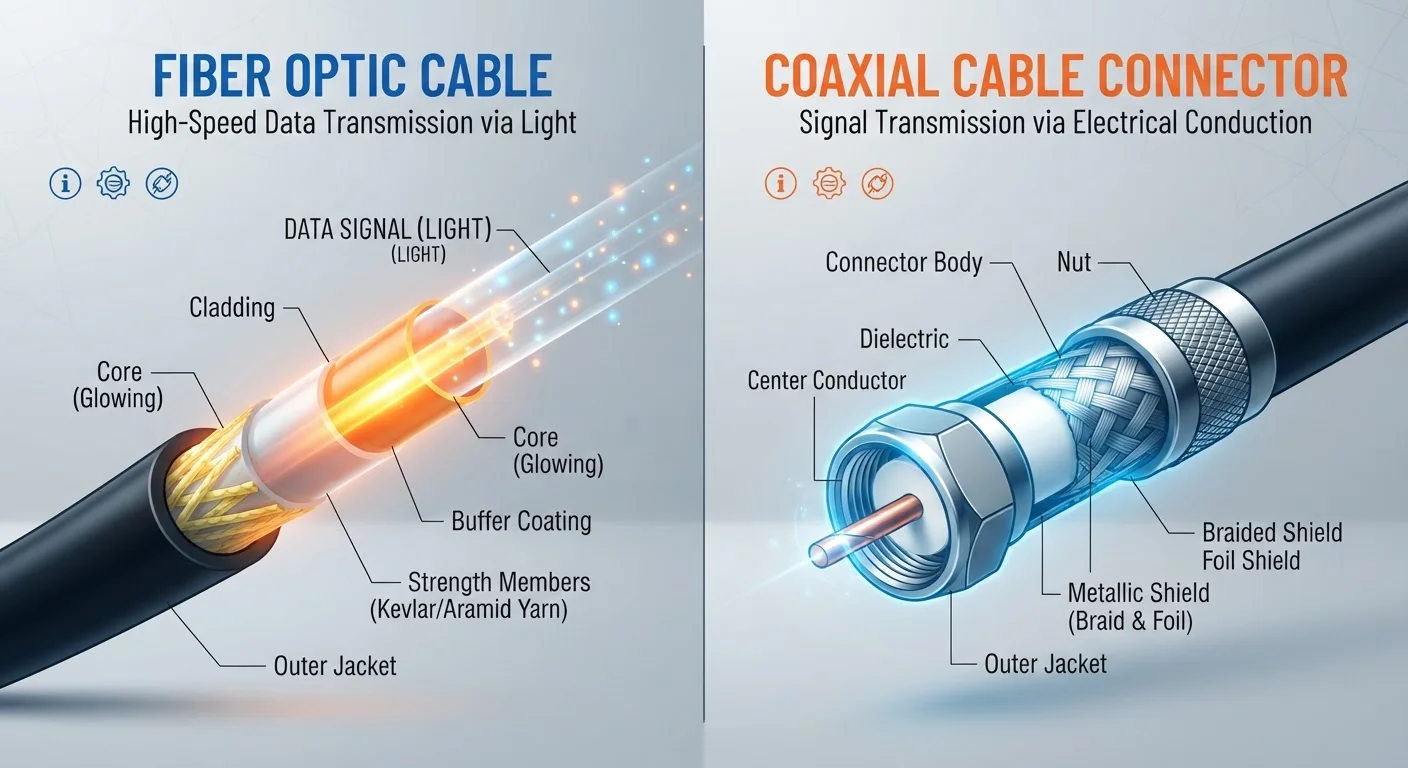
- Fiber transmits data as light through glass strands; cable uses electrical signals over coaxial copper lines.
- Fiber typically offers symmetrical upload and download speeds; cable upload speeds are usually much slower.
- Cable internet is available to roughly 89% of U.S. homes; fiber reaches a significantly smaller share.
- Both technologies can support streaming, gaming, and remote work - the gap matters more at higher usage levels.
- Network congestion during peak hours affects cable more noticeably than fiber due to shared infrastructure.
- Availability, not preference alone, often determines which technology a household can actually access.
Option A
Fiber Internet
The newer, higher-capacity infrastructure built for symmetrical, future-ready performance.
Best for: Households with heavy upload needs, multiple simultaneous users, or anyone prioritizing consistent, low-latency speeds.
Option B
Cable Internet
The widely available, proven technology running on existing coaxial cable networks.
Best for: Users who want strong download speeds across a broad range of budgets in areas where fiber hasn't yet arrived.
If you work from home and frequently upload large files or video conference
Fiber Internet
Fiber's symmetrical speeds mean upload performance matches download, which matters significantly for video calls, cloud backups, and file transfers.
If fiber isn't available at your address
Cable Internet
Cable reaches the vast majority of U.S. households and delivers download speeds sufficient for most everyday tasks, including streaming and casual gaming.
If multiple people in your home stream, game, or work online simultaneously
Fiber Internet
Fiber's dedicated, unshared connection handles concurrent high-bandwidth use without the peak-hour slowdowns common on cable networks.
If you need reliable service at a predictable monthly cost and aren't a heavy uploader
Cable Internet
Cable plans are widely available, competitively priced for download-heavy use cases, and sufficient for typical household streaming and browsing.
How Each Technology Actually Works
The most important difference between fiber and cable internet isn't a spec on a marketing page - it's the physical medium carrying your data.
Fiber optic internet transmits data as pulses of light through thin glass or plastic strands. Because light travels with almost no signal degradation over distance, fiber connections can maintain consistent performance whether your home is near or far from the provider's node. The infrastructure is also immune to electromagnetic interference, which can subtly affect copper-based systems.
Cable internet uses the same coaxial copper cable that delivers cable television. It relies on electrical signals rather than light, and most cable networks use a shared architecture - meaning the bandwidth in your neighborhood is divided among active users. This works well the majority of the time, but it can lead to slower speeds during peak usage hours (typically evenings and weekends) when many households are online simultaneously.
For a deeper look at how these speed and performance terms translate to real-world use, see our plain-English glossary of internet speed terms.
| Criterion | Fiber Internet | Cable Internet |
|---|---|---|
| Signal medium | Light through glass/plastic strands | Electrical signal over coaxial copper |
| Download speeds (typical range) | 100 Mbps - 5 Gbps | 25 Mbps - 1.2 Gbps |
| Upload speeds | Symmetrical (matches download) | Significantly lower than download |
| Peak-hour congestion | Minimal - dedicated lines | More noticeable - shared neighborhood bandwidth |
| Latency | Generally lower | Moderate; adequate for most tasks |
| U.S. household availability | Growing but still limited | ~89% of U.S. homes |
| Infrastructure age | Newer, purpose-built for data | Adapted from TV cable networks |
Upload Speeds: The Overlooked Difference
Download speed gets the headline, but upload speed is where fiber and cable diverge most sharply - and where that gap has the most real-world impact.
Most cable plans are configured asymmetrically: download speeds may be 300 Mbps or higher, while upload speeds are often capped at 10-35 Mbps on older DOCSIS 3.0 networks. Newer cable infrastructure using DOCSIS 3.1 improves on this, but upload capacity still typically lags well behind download on most deployed cable systems.
Fiber plans, by contrast, are commonly offered with symmetrical speeds - the same rate for both upload and download. For households where one or more people regularly video conference, upload content to cloud storage, stream live, or work with large files, this asymmetry in cable plans becomes a genuine constraint rather than an abstract specification.
~43%
U.S. homes with fiber access
As of the FCC's 2023 Broadband Data Collection report, fiber-to-the-premises service is available to roughly 43% of U.S. housing units.
~89%
U.S. homes with cable broadband access
The FCC's broadband data indicates cable internet (via coaxial or hybrid fiber-coax networks) reaches approximately 89% of U.S. housing units.
10-35 Mbps
Typical cable upload speed on DOCSIS 3.0
Older DOCSIS 3.0 cable deployments commonly cap upload speeds in this range, even when download speeds exceed 300 Mbps.
Understanding how your connection behaves once it enters your home is equally important. See how wired vs. Wi-Fi connections affect your performance to make the most of whichever service you have.
Availability and Infrastructure Reality
No technology comparison is useful in isolation from where you actually live. Fiber internet, despite its technical advantages, remains unavailable to a large portion of U.S. households. Buildout is expensive and concentrated in denser urban and suburban markets, leaving many rural and some suburban areas reliant on cable, DSL, or satellite.
Cable internet's reach is a meaningful advantage. Its existing infrastructure - originally laid for TV service - already passes most American homes, making cable the default broadband option for a wide share of the country.
If you live outside the fiber or cable footprint entirely, fixed wireless and DSL are the main alternatives worth comparing covers what those options realistically deliver. For even more remote situations, satellite internet carries important trade-offs to understand lays out what to expect.
Check Availability Before Comparing Plans
ISP coverage maps are a starting point, but they're known to overstate availability in some areas. The FCC's Broadband Map (broadbandmap.fcc.gov) and state-level maps offer additional verification tools. When possible, confirming availability by entering your specific address directly on a provider's website gives the most reliable answer before you invest time comparing plan options.
Reliability factors extend beyond the connection type itself. a broader set of factors shapes your home internet reliability - from your router hardware to how your ISP manages congestion.
Before committing to any plan, it's worth reviewing the contract details carefully. understanding your ISP contract's fine print can help you avoid surprises around data caps, promotional pricing, and early termination fees.